

Supabase Sumo Push
Learn how to use Supabase as the backend of a multiplayer web game hosted on Edgegap.
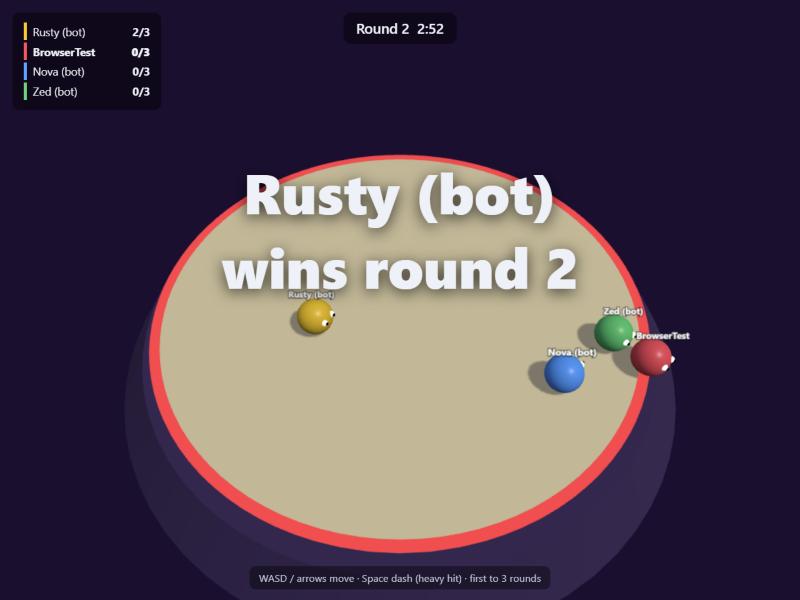
This sample takes Sumo Push, a three.js party game from the Three.js Minigames sample, and adds Supabase as its backend. Players sign in, keep a profile, climb a live leaderboard, and click Find match. Edgegap's matchmaker starts an authoritative node.js server near them, which records the result in Supabase and stops itself when the match is over.
Supabase: sign-in, profiles, wins, match history, leaderboard updates, and the gateway to the matchmaker.
Edgegap: matchmaking, and one dedicated server per match, near its players.
This sample shows:
Anonymous sign-in: every player gets a real Supabase user without an email or password, and keeps it on the next visit. Link an email or OAuth identity later to keep progress across devices.
Find match through a Supabase Edge Function: the page never holds the matchmaker token. The function checks the player's session, joins the matchmaker, and remembers which ticket belongs to which player.
Players verified by the game server: each player sends their Supabase access token when connecting. The server checks its signature against the project's public keys, so it knows who is playing without holding any Supabase key.
Results the server reports: when a match ends, the server sends scores to a second Edge Function. Postgres only accepts players who came with their own, unused ticket for that match, so results can't be forged or counted twice.
Row Level Security: players can read profiles and matches, and rename themselves, but can't change their wins.
Live leaderboard with Supabase Realtime: a match ending anywhere updates every open page.
✔️ Preparation
Before we start, you will need:
Node.js 22 or newer, to run the server and pages locally, and the Supabase CLI through
npx.Docker, to build the server image.
A Supabase account. The free plan is enough.
☑️ Try the game locally first:
Open http://localhost:8080, click Local server, and open a second tab to play against yourself. Without Supabase configured, the server lets anyone in and records nothing. npm test plays a full match with two headless players.
🗄️ Supabase Backend
1. Create the Project
☑️ Create a Supabase project and apply the sample's schema:
npx supabase orgs list shows your organization ID. db push creates the profiles, tickets, matches and match_players tables, their Row Level Security policies, a trigger giving every new user a profile, and the record_match() function.
☑️ In the Supabase dashboard, open Authentication, then Sign In / Providers, and enable Allow anonymous sign-ins.
☑️ Copy client/config.js to client/config.local.js and fill in your Project URL and Publishable key, from Project Settings, then API Keys.
☑️ Reload http://localhost:8080: the menu shows your generated player name, your record and the leaderboard. Rename yourself, and the name is saved to your profile.
✅ You may now proceed to the next step.
⚡ Deploy and Connect
2. Build the Server Image
☑️ To get started, you'll need to create a free account with Edgegap. No credit card required.
☑️ Find your Container Registry project name and credentials.
☑️ Sign in to Edgegap's Container Registry with Docker, using your registry project name, username and token:
☑️ Build and push the image containing the game server, tagged with the build time:
✅ You may now proceed to the next step.
3. Create the App Version
☑️ Create an application named sumo-supabase, with one version named after your tag:
Image:
registry.edgegap.com/<project>/sumo-supabase, tag<tag>,Registry credentials: your Container Registry username and token, so Edgegap can pull the image,
Resources: 0.25 vCPU and 512 MB memory,
Port:
7777, namegameport, protocol WS, with TLS Upgrade enabled,Environment variables:
SUPABASE_URL- your project URL,https://<project-ref>.supabase.co,GAME_SERVER_SECRET- a long random string, marked hidden, shared with Supabase in step 5,REQUIRE_TICKET-1, to refuse players the matchmaker didn't send to this match,
Max duration: 30 minutes, as a safety net: the server stops itself.
✅ You may now proceed to the next step.
4. Create the Matchmaker
☑️ Set application.name and application.version in the sample's edgegap/matchmaker-config.json to your app and version.
☑️ Open the Matchmaker page in the dashboard, click Create, upload the config, and click Create and Start.
The sumo profile matches 2 to 8 players. After 20 seconds, a player waiting alone gets a server, and bots fill the empty seats.
☑️ When the matchmaker shows Online, copy its API URL and Auth Token.
✅ You may now proceed to the next step.
5. Deploy the Edge Functions
☑️ Store the matchmaker details and the game server secret in Supabase, then deploy both functions:
matchmakingchecks the player's session, then joins the matchmaker as a group of one, polls it, and returns the server'swss://address and the player's ticket ID. Itscancelaction leaves the queue by deleting the player's group.report-matchchecks the game server's secret, then callsrecord_match().
✅ You may now proceed to the next step.
6. Find a Match
☑️ Open http://localhost:8080 in two browsers (or a normal and a private window, since one browser profile shares one Supabase session). Click Find match in both within 20 seconds.
Each page:
calls the
matchmakingEdge Function every 1.5 seconds until the matchmaker returnsHOST_ASSIGNED,connects to
wss://<fqdn>:<port>and sends its ticket ID and Supabase access token,plays: it sends inputs and draws the state the server sends back.
The game server:
verifies each player's access token against
https://<project-ref>.supabase.co/auth/v1/.well-known/jwks.json, and their ticket against the match'sMM_TICKET_IDS,runs the match,
sends every player's ticket, user ID, score and place to
report-match,stops its own deployment after the results screen.
🙌 Both players are now in the same match, on a server placed near them, and the leaderboard updates on both pages when it ends.
☑️ To test the whole path without a browser, run the end-to-end test. It signs in headless players, finds them a match through the Edge Function, plays it, reads the result back from Supabase, and waits for the deployment to stop itself:
📦 Ship Your Game
Host the page anywhere: it's static files with no build step (
index.html,client/,game/).Let players keep their account across devices by linking an email or OAuth identity to their anonymous user.
Turn
inspectoff in the matchmaker config before launch.Lower
FIRST_JOIN_TIMEOUT_S(for example to60), so servers whose players all left before joining stop sooner.Clean up old rows in the
ticketstable, for example with a dailypg_cronjob.To ship a new server build, push a new image tag and point the app version at it. New matches use it, and running ones keep the old build.
Was this helpful?