Private Fleets
Reserve standby capacity on monthly basis and choose your preference between Virtual Machines (Performance) or Bare Metal (Overdrive) specifications.
Private Fleets are an optional addition to Edgegap Cloud (default), a popular hosting option:
enabling Persistence with 24/7 always online servers, and
favorable Match-Bound pricing with predictable traffic.
π Upgrade to Pay as You Go tier to unlock private fleets hosting with standby capacity!
Alternatively, see Match-Bound cloud orchestration to utilize fractional vCPU pricing.
βοΈ Introduction
Private Fleets let you pick specific host locations and reserve dedicated standby compute capacity within our globally available provider-agnostic infrastructure, suitable for:
live games with predictable daily traffic patterns and stable player communities,
persistent 24/7 servers featuring open worlds with user-generated content placed by players,
MMO games prioritizing social experiences with high amount of concurrent users per server.
βοΈ Allocations
Orchestrating your fleet capacity efficiently can make or break your cost savings. Finding the optimal ratio between Fleet and Cloud Overflow hybrid requires multiple iterations.
1. Schedule Hosts
Planning your Private Fleet capacity is an important recurring monthly DevOps activity.
Scheduling additional hosts for your fleet ahead of time is recommended if you expect any special events impacting your capacity such as:
global or regional launch, or a major update,
blanket discount, or free test weekend,
streamer event, tournament, or other public event.
The minimum commitment period for fleet hosts is one (1) month. Once your host is started, the earliest date for scheduling host deletion and reducing cost is end of month.
Use early signals (e.g. wishlists) to project regional demand and mitigate overprovisioning. Struggling to project traffic with confidence? Start low and Overflow to Cloud.
Locations
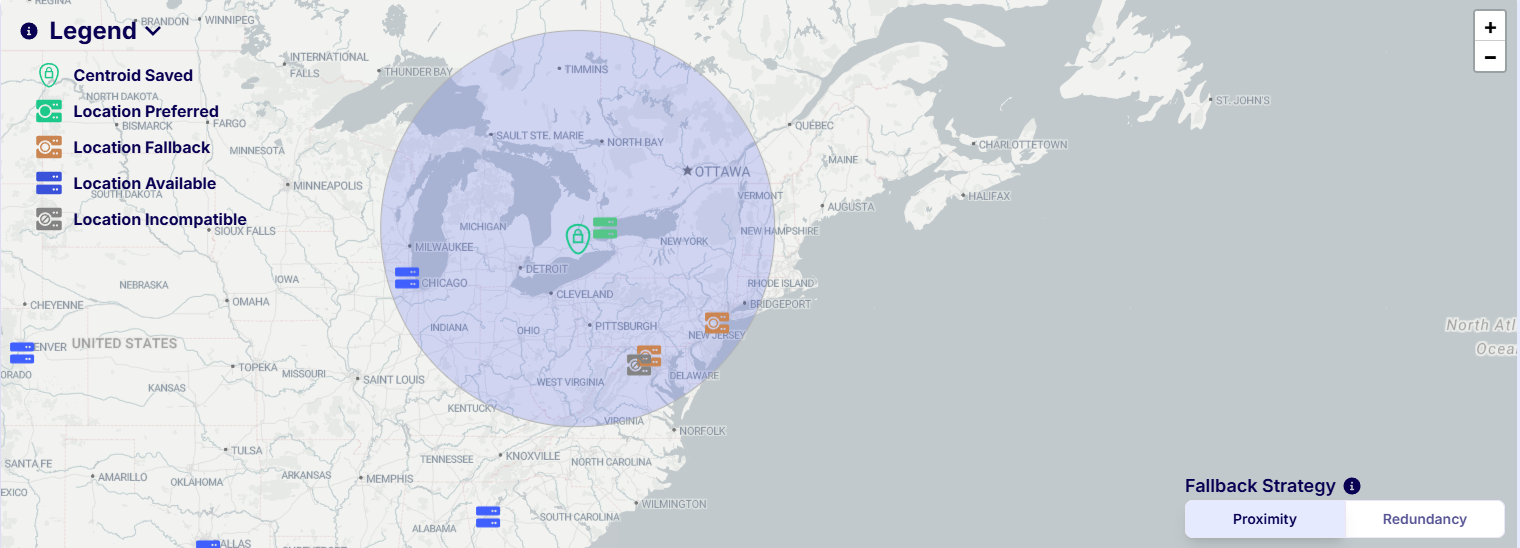
Drop a pin on the map and preview your primary/fallback locations for new hosts.
Select a fallback strategy to control suitable locations for each centroid:
Proximity (default) - 700 km centroid radius, for precise control.
Redundancy - 1,400 km centroid radius, allowing more fallback locations.

Location availability depends on chosen hardware specification. Overdrive availability is limited.
π’ API provisioning under development, let us know about your Continuous Integration needs!
2. Discover Hosts
Starting your Deployments manually, pasting URL and ports will not cut it for a live game.
Automate popular game flows for managing sessions and scaling on demand with either:
Shorter Rounds
On-Demand Matches
Skill Rating and/or Custom Rules
Persistent or Rounds
Social Regional Hubs
Auto-Assign and/or Custom Search
Custom Backend:
Migrate Live Games
Your session orchestration must be aware of available hosts to utilize fleet capacity:

On-Demand deployments:
Matchmaking maintains a cached list of hosts, refreshed every minute.
Matchmaking assigns one of the available beacons to each active host.
Players receive host assignment depending on the best matched beacon.
Pre-Warmed deployments:
Your DevOps administrator reviews available hosts and configures policies.
Players get an auto-assigned seat, or search and choose a server.
Custom integrations fetch hosts and deploy servers using πΊοΈ Private Fleets API.
3. Deploy Servers
Start deployments on Private Fleet using the same parameters as Cloud deployments, with the added option to specify a prioritzed list of host IDs you wish to deploy to.
Deployments will be started on the first private host with sufficient capacity in your request. If no listed host has capacity available at the time, deployments will Overflow to Cloud.
Overflow to Cloud
Unexpectedly high player traffic may exceed your current fleet capacity, causing some deployments to utilize Cloud Overflow instead of your Private Fleet. Cloud limitations apply.
Prepare for this possibility and review differences:
Billing Model
Per Host, Monthly
Per vCPU and minutes used
βοΈ Hardware
Pick one of our generic host specifications:
Best Suited For
match-based games, or with predictable traffic
CPU-intensive games (AI), or above 1:2 CPU/RAM ratio
CPU Specifications
16 vCPU 2.0 - 3.7 GHz frequency
16 vCPU 3.7 - 5.1 GHz frequency
RAM Specifications
32 GB
64 GB
Free Egress Included
5 TB per Host
5 TB per Host
Price, pre-paid monthly
(commitment based)
$250.00 per Host
$290.00 per Host
Estimate cloud/fleet ratios with pricing calculator. Get final fleet price using dashboard reservation.
Your first month's reservation price and free egress quota are pro-rated. This means you are charged only for the portion of time until the end of current month.
Reservations automatically renew on the first day of every month at 00:00 UTC until deleted. Your card will be automatically charged the monthly amount for renewed hosts at this time.
A fleet with active hosts may not swap specifications. Create a new fleet or delete active hosts first.
Small amount of resources on each host is reserved for Operating System, Monitoring, and Orchestration.
Modifying Schedule and Deleting Hosts
You may modify or delete a schedule at any time prior to the scheduled time, at no charge. You may designate any number of reserved (active) private hosts for deletion at the end of the current billing period, prior to the renewal date. Deleted hosts will not be charged for subsequent renewals. Any deployments running on private hosts scheduled for deletion will be gracefully shut down at the time of deletion without additional warnings.
Delayed Start or Insufficient Provider Capacity
In the event of delayed private host start or insufficient provider capacity, your payment amount and invoice for the scheduled or renewal periods will be adjusted accordingly.
π Host Lifecycle
Private Fleet hosts follow a simple lifecycle sequence.
1. Pending
New hosts have been requested, we're starting them in order of distance from your pin.
In our List Hosts API, hosts in this stage are indicated with status PENDING.
2. Active
Host is active and responsive, ready to 1. Start a Deployment.
In our List Hosts API, hosts in this stage are indicated with status ACTIVE.
3. Scheduled for Deletion
While stile active, this host will be deleted at the end of the current billing period (month). This action can be reverted (cancelled) at any time until deletion takes place.
In our List Hosts API, hosts in this stage are indicated with non-null delete_schedule .
4. Deleting
When a host reaches the scheduled deletion time, new deployments will no longer be assigned to it.
In our List Hosts API, hosts in this stage are indicated with status PERMANENTLY_REMOVING.
Deployments running on private hosts will be gracefully stopped once the host is deleted.
Prevent frustration due to rollbacks and gameplay disruption by notifying players and rerouting new deployments to other private fleet hosts, once a private host scheduled for deletion is nearing shutdown.
5. Error and Other
In case of issues with the provider or the host, our platform marks the host as DEFECTIVE and attempts to start a new host as replacement at no additional charge. The new host will always be started in the same location and bear the same name. For a short period of time, you may see both the defective and the new replacement host with the same name.
When transitioning between states, a host may shortly report SERVICE_UNAVAILABLE .
We reserve a few other states to indicate special circumstances: ERROR , DOWN, MAINTENANCE .
If you need help, please reach out to us over Discord. For live games support see our ticketing system.
Last updated
Was this helpful?