> For the complete documentation index, see [llms.txt](https://docs.edgegap.com/llms.txt). Markdown versions of documentation pages are available by appending `.md` to page URLs; this page is available as [Markdown](https://docs.edgegap.com/zh/docs/endpoint-storage/save-container-logs.md).
# 如何保存日志
将 Edgegap 部署中的游戏服务器容器日志保存到你自己的 S3 存储桶中,以便后续分析。
当您创建部署时,容器会生成日志。终止部署后,您可以将这些日志保存到您选择的 S3 存储桶。通过设置端点存储(Endpoint Storage),您将能够随时检索这些日志,即使在部署已终止之后。
### 将您的端点存储与应用版本链接
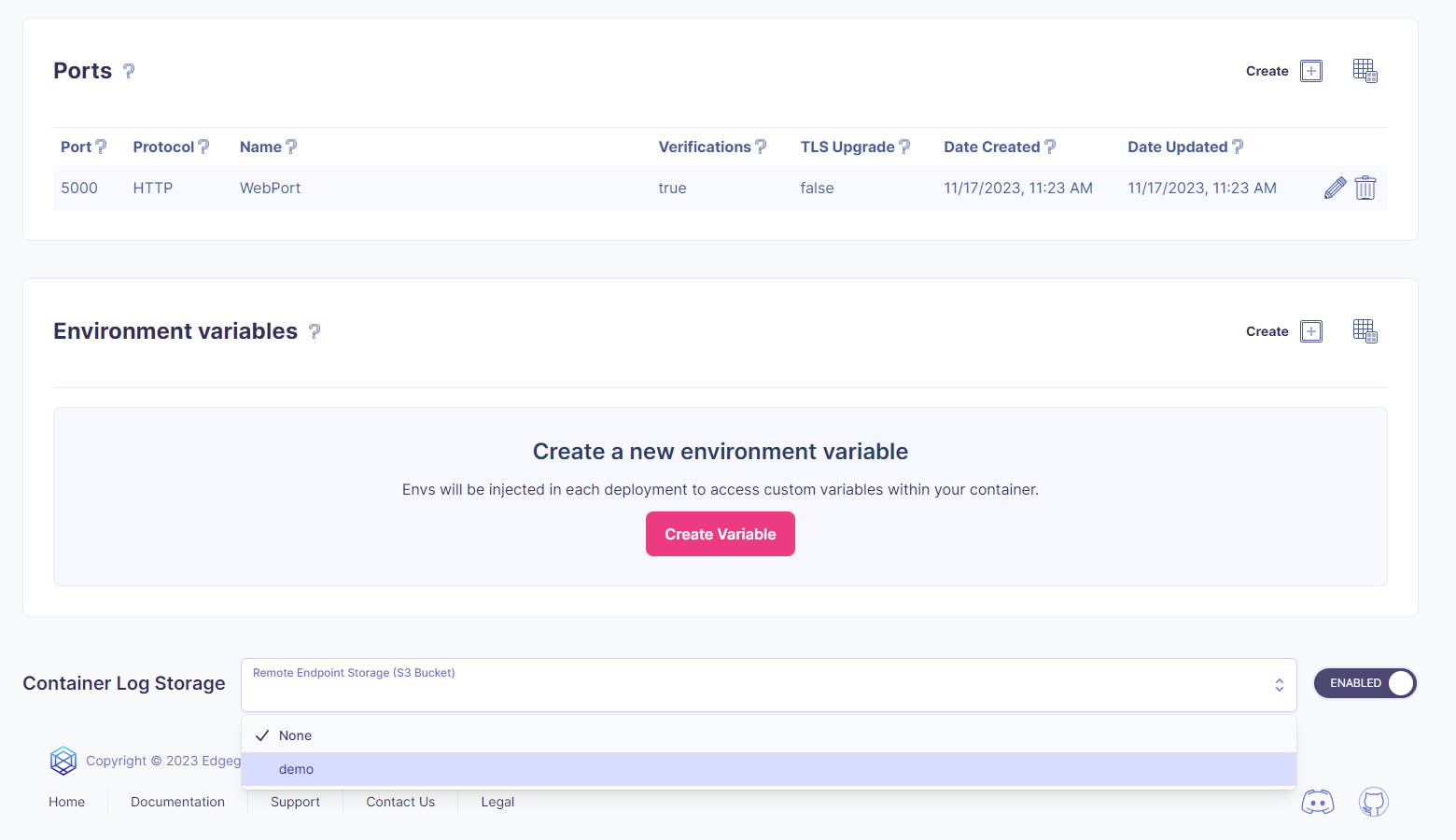
为此,您需要将应用版本链接到端点存储。导航到应用版本详细信息页面,查找 **容器日志存储** 部分。启用开关并在选择框中选择您的端点存储。
 {% hint style="warning" %}
如果启用容器日志存储但未选择有效的端点存储,则无法检索日志。要确保您有有效的端点存储,请参考 [设置文档](/zh/docs/endpoint-storage.md).
{% endhint %}
就是这样!使用此应用版本的每次部署现在都会将容器日志存储到您的 S3 存储桶中。
#### 默认目录路径
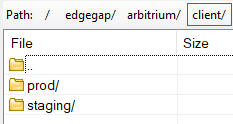
您在 S3 存储桶中的路径将如下所示。
* edgegap/arbitrium
* 客户电子邮件的第一部分,大多数 S3 浏览器不喜欢“@”符号
* 您的端点存储的名称
* app / 应用版本 / container\_log
* 日期 YYYY-MM-DD
{% hint style="warning" %}
如果启用容器日志存储但未选择有效的端点存储,则无法检索日志。要确保您有有效的端点存储,请参考 [设置文档](/zh/docs/endpoint-storage.md).
{% endhint %}
就是这样!使用此应用版本的每次部署现在都会将容器日志存储到您的 S3 存储桶中。
#### 默认目录路径
您在 S3 存储桶中的路径将如下所示。
* edgegap/arbitrium
* 客户电子邮件的第一部分,大多数 S3 浏览器不喜欢“@”符号
* 您的端点存储的名称
* app / 应用版本 / container\_log
* 日期 YYYY-MM-DD
 您可以使用相同的 S3 存储桶创建多个端点存储,但使用不同的名称。这样,如果需要,您可以为多个环境设置不同的目录。
 #### 其他用例
{% hint style="success" %}
这些用例在测试时很有用,当您不希望将所有部署的日志都发送到存储时尤其如此。
{% endhint %}
**在部署请求中保存容器日志**
创建部署时,您可以指定是否希望将容器日志与部署请求一起存储。这与应用版本设置是独立的,这意味着不需要事先在应用版本中设置端点存储,只需有一个可用的端点存储即可。
您可以通过在部署请求中添加以下 JSON 来实现。字段 `endpoint_storage` 是您的端点存储的名称。
```json
{
"container_log_storage": {
"enabled": true,
"endpoint_storage": "demo-bucket"
}
}
```
{% hint style="info" %}
如果未提供 `endpoint_storage` 我们将尝试使用应用版本的端点存储。如果未找到端点存储,则不会存储容器日志。
{% endhint %}
**在停止请求中保存容器日志**
另一种方便的方式是在您终止部署时使用它。如果您有理由认为容器内部出现了问题,可以请求保存容器日志。此选项可在部署停止(Deployment stop)和自我停止(Self stop)路由中使用。
您可以通过在请求中添加查询参数来实现 `container_log_storage` 该参数 `container_log_storage` 是您的端点存储的名称。您也可以填写 `true` 以使用应用版本的端点存储。
您可以查看我们的 [API 文档](/zh/docs/api.md) 以获取有关部署和停止请求参数的更多详细信息。
#### 其他用例
{% hint style="success" %}
这些用例在测试时很有用,当您不希望将所有部署的日志都发送到存储时尤其如此。
{% endhint %}
**在部署请求中保存容器日志**
创建部署时,您可以指定是否希望将容器日志与部署请求一起存储。这与应用版本设置是独立的,这意味着不需要事先在应用版本中设置端点存储,只需有一个可用的端点存储即可。
您可以通过在部署请求中添加以下 JSON 来实现。字段 `endpoint_storage` 是您的端点存储的名称。
```json
{
"container_log_storage": {
"enabled": true,
"endpoint_storage": "demo-bucket"
}
}
```
{% hint style="info" %}
如果未提供 `endpoint_storage` 我们将尝试使用应用版本的端点存储。如果未找到端点存储,则不会存储容器日志。
{% endhint %}
**在停止请求中保存容器日志**
另一种方便的方式是在您终止部署时使用它。如果您有理由认为容器内部出现了问题,可以请求保存容器日志。此选项可在部署停止(Deployment stop)和自我停止(Self stop)路由中使用。
您可以通过在请求中添加查询参数来实现 `container_log_storage` 该参数 `container_log_storage` 是您的端点存储的名称。您也可以填写 `true` 以使用应用版本的端点存储。
您可以查看我们的 [API 文档](/zh/docs/api.md) 以获取有关部署和停止请求参数的更多详细信息。