> For the complete documentation index, see [llms.txt](https://docs.edgegap.com/llms.txt). Markdown versions of documentation pages are available by appending `.md` to page URLs; this page is available as [Markdown](https://docs.edgegap.com/~/changes/305/learn/server-browser/in-depth-look.md).

# In-Depth Look

**Welcome to Edgegap Server Browser exclusive early access.** We hope you enjoy the opportunity to preview our new service, and help shape it's future through roundtable discussions in our Discord.

{% hint style="success" %}
Found this page by accident? [**Register for Server Browser CLOSED BETA now**, limited availability!](https://forms.gle/LGtHP46JPaPhLg787)
{% endhint %}

Server Browser is a managed service for [Deployments](/~/changes/305/learn/orchestration/deployments.md#match-bound) and [persistent](/~/changes/305/learn/orchestration/persistence.md) servers:

* **help players list and join suitable servers** based on capacity, latency, or game parameters;
* 📢 **pre-warm new servers** to serve global demand at scale and prevent frustrating queues;
* 📢 **streamline server operations** including updates, restarts, persistence, meshing, and more.

{% hint style="success" %}
Looking to match players based on strict rules, without allowing server choice? Consider [Matchmaking](/~/changes/305/learn/matchmaking.md).
{% endhint %}

{% hint style="warning" %}
Disclaimer: Although we strive to minimize breaking changes, some details may change in the process, as we consider your feedback, release new updates, and iterate through our CLOSED BETA and beyond.
{% endhint %}

<figure><img src="https://3027732442-files.gitbook.io/~/files/v0/b/gitbook-x-prod.appspot.com/o/spaces%2FsR0dHSFv9ymoC0DO5G8J%2Fuploads%2FwKrq9tLaamRoM6vSLXZu%2Fimage.png?alt=media&amp;token=83756c6f-d413-4ac1-988e-b90e7fa7a0a6" alt=""><figcaption></figcaption></figure>

{% hint style="info" %}
Items marked with 📢 icon are features planned for OPEN BETA and beyond (not available yet).
{% endhint %}

## ✔️ Preparation

**Testing this service is entirely free, no credit card required.**

Free Tier allows up to 3 hours of runtime on our shared test cluster, after each restart.

This tutorial assumes you have already:

* [understood Edgegap’s deployment model](https://docs.edgegap.com/~/changes/305/learn/server-browser/pages/0UXQAhtFuL0FkdoUmYTh#id-1.-just-in-time-deployment-dedicated-servers),
* published your server application on Edgegap ([Unreal Engine](/~/changes/305/unreal-engine.md), [Unity](/~/changes/305/unity.md)),
* successfully connected from a game client to your server on Edgegap.

### Networking Flows

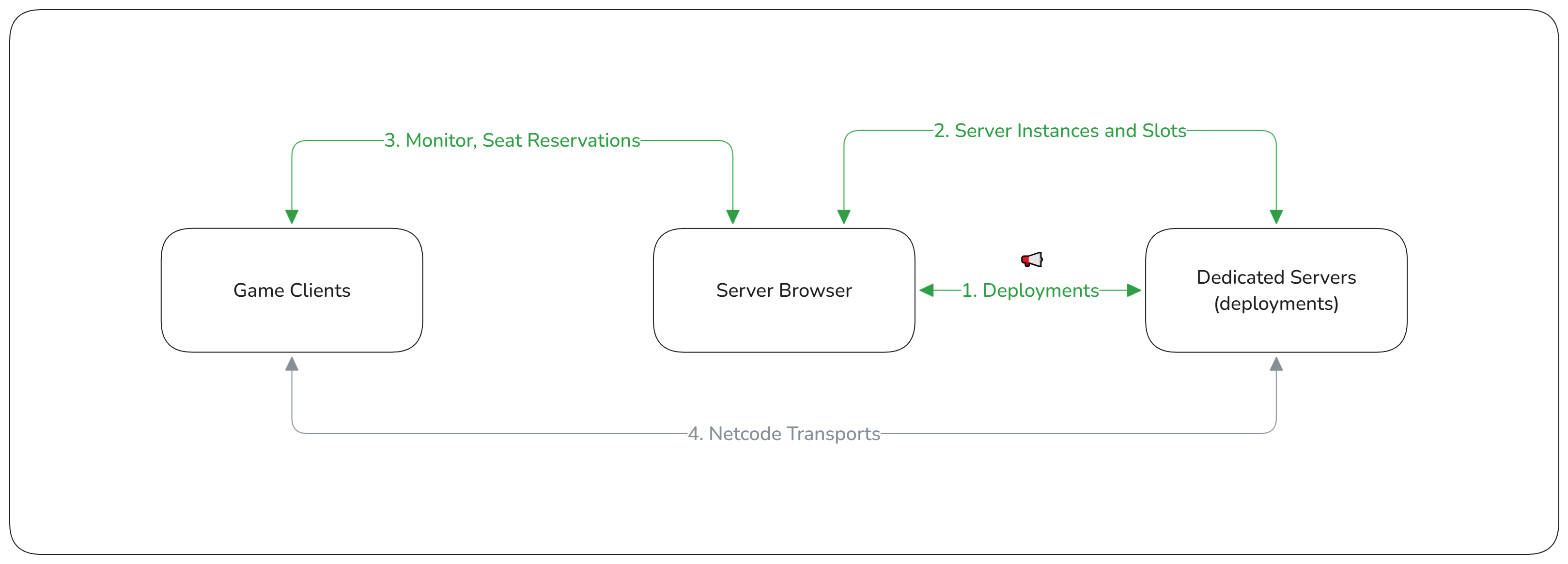
<figure><img src="https://3027732442-files.gitbook.io/~/files/v0/b/gitbook-x-prod.appspot.com/o/spaces%2FsR0dHSFv9ymoC0DO5G8J%2Fuploads%2F8JaWfO6ihZDIcseVkQMS%2Fimage.png?alt=media&amp;token=b2a70a3e-ec17-4b87-bac2-a317ee3bf8af" alt=""><figcaption><p>Server Browser Architecture</p></figcaption></figure>

There are four (4) important flows of data when using Server Browser:

1. [**Deployments API**](/~/changes/305/docs/api/dedicated-servers.md#deployments) **is used to deploy, scale, and manage your Dedicated Servers.**
   1. Use [v2/deploy API](/~/changes/305/docs/api/dedicated-servers.md#post-deployments) for [match-bound sessions](/~/changes/305/learn/orchestration/deployments.md#match-bound) lasting less than 24 hours.
   2. Use [private fleet deploy API](/~/changes/305/docs/api/dedicated-servers.md#post-private-fleets-deploy) to start [standby servers](/~/changes/305/learn/orchestration/deployments.md#regional-standby) with [Persistence](/~/changes/305/learn/orchestration/persistence.md).
   3. 📢 Use Hot Standby for rule-based auto-scaling and meshing support.
2. [**Server API**](#server-lifecycle) **used by Dedicated Servers to announce availability and manage capacity.**
3. [**Seat Reservation API**](#player-lifecycle) **used by Game Clients to discover and connect to Dedicated Servers.**
4. Netcode Transports are used to communicate between Game Clients and Dedicated Servers.

{% hint style="info" %}
After release, **your server browser will need to run 24/7** to ensure players across the world can join servers.
{% endhint %}

## ▶️ Start Browsing

Learn about server/player lifecycle and their responsibilities to ensure efficient server use.

### Authenticate

In addition to your existing game client authentication using your Game Backend, all requests for the Matchmaker must send an `Authorization`  HTTP header with your secret **Auth Token:**

<pre><code>Authorization: <a data-footnote-ref href="#user-content-fn-1">xxxxxxxx-e458-4592-b607-c2c28afd8b62</a>
</code></pre>

{% hint style="warning" %}
**Keep your tokens secret and safe! Edgegap staff will never ask you for your tokens.**
{% endhint %}

Server Browser automatically generates two types of tokens:

* **Server Token** - required for [Server API](#server-lifecycle) methods, can be [injected as app version variable](/~/changes/305/learn/orchestration/application-and-versions.md#injected-variables).
  * Grants access to all API methods, and is handy for testing, devops, or custom orchestrators.
* **Client Token** - required for [Monitor and Seat Reservation API](#player-lifecycle) methods used by Game Clients.
  * We recommend storing this token in a third party secret store to make token rotation easier.

### Discover Instance

[**Deployments API**](/~/changes/305/docs/api/dedicated-servers.md#deployments) **is used to deploy, scale, and manage your Dedicated Servers.**

* Use [v2/deploy API](/~/changes/305/docs/api/dedicated-servers.md#post-deployments) for [match-bound sessions](/~/changes/305/learn/orchestration/deployments.md#match-bound) lasting less than 24 hours.
* Use [private fleet deploy API](/~/changes/305/docs/api/dedicated-servers.md#post-private-fleets-deploy) to start [standby servers](/~/changes/305/learn/orchestration/deployments.md#regional-standby) with [Persistence](/~/changes/305/learn/orchestration/persistence.md).
* 📢 Use Hot Standby for rule-based auto-scaling and meshing support.

When you start new [Deployments](/~/changes/305/learn/orchestration/deployments.md), **notify Server Browser about a new Instance and set any number of optional custom parameters** useful for player filtering, sorting, and browsing:

* slot information - team capacity and team-specific metadata (e.g. team name),
  * **at least one slot per instance is required to manage player capacity;**
* name and tags - customizable, unique, human-readable and searchable labels;
* connection details - URL, IP, external ports, or other parameters;
* compatibility data - server version or supported client versions;
* latency qualifiers - city and region identifiers, and assigned [Ping Beacons](/~/changes/305/learn/orchestration/ping-beacons.md) details;
* game parameters - level/scene/map, game mode, difficulty, mods used;
* any other custom parameters to help players filter and find a suitable server.

Metadata supports string keys and values containing string, number, boolean, or array of strings.

{% hint style="success" %}
To serialize nested objects try encoding their accessor path in the key as `"object.child.property"`.
{% endhint %}

Servers may **update instance or slot metadata anytime** to modify their discoverability criteria.

**Server Instances must periodically send a keep-alive heartbeat** to verify their ongoing availability and prevent players from attempting to join crashed or offline servers. Missing the heartbeat for 30 seconds will automatically remove the instance and any pending seat reservations.

📢 Servers may update their instance to "hibernation mode" before they are scaled down (stopped) to remain discoverable without sending further heartbeat requests. When a player requests to [#reserve-seats](#reserve-seats "mention") for a hibernating instance, Server Browser will redeploy your server automatically.

{% hint style="info" %}
See [Persistence](/~/changes/305/learn/orchestration/persistence.md) for managing persistent world state and [Apps and Versions](/~/changes/305/learn/orchestration/application-and-versions.md#active-caching) for faster deployments.
{% endhint %}

### Search and Browse

Players may list server instances and [paginate through results](#pagination) to find a server they'd like to join. To display ping (latency) data, read each instance's [Ping Beacons](/~/changes/305/learn/orchestration/ping-beacons.md) details and [measure latency](/~/changes/305/learn/orchestration/ping-beacons.md#measuring-round-trip-time).

📢 Instances and slots may be sorted or filtered by available seats or any metadata key. Filter and sort by regions and/or cities to narrow down selection before measuring latency to servers.

### Reserve Seats

Before joining a server, a seat reservation is required to ensure that the instance offers sufficient available capacity. Reservations can include a group of players or a solo individual.

**Reservations exceeding slot's joinable seat capacity will be automatically rejected** ([409 Conflict](https://developer.mozilla.org/en-US/docs/Web/HTTP/Reference/Status/409)). Joinable seats are any available seats which have not been reserved by other players yet.

Federated Identity: Players must provide a unique third party player ID in their reservation. Sending the same ID once they [#connect-to-server](#connect-to-server "mention") will allow the server to verify their identity.

Once a reservation is made successfully ([200 OK](https://developer.mozilla.org/en-US/docs/Web/HTTP/Reference/Status/200)) players should attempt connecting immediately. Pending **reservations will expire after 30 seconds unless they are confirmed** by your server.

{% hint style="info" %}
Server may forcefully change any slot's capacity, add, delete, or update any slots. **All reservations for a given slot will be removed if any pending reservations exceed new available slot capacity.**
{% endhint %}

### Connect to Server

Once a player found a suitable instance, they can **retrieve required connection details from metadata** (URL, IP, [External Port](/~/changes/305/learn/orchestration/application-and-versions.md#port-mapping)). As soon as the seat reservation is made, **players may proceed to connect to your deployment's game server and pass their player ID**.

{% tabs %}
{% tab title="Unreal Engine" %}
To **connect from PIE (Editor)** during development and testing, press the tilde key `~`  and type `open {URL}:{port}` and wait for your editor to load the map.

{% hint style="success" %}
In case of failed connections or dark screen consult our [troubleshooting guide](/~/changes/305/unreal-engine.md#troubleshooting-and-faq-1).
{% endhint %}
{% endtab %}

{% tab title="Unity" %}
To **connect your Unity Editor** or **game client** to your cloud deployment, input:

* **Deployment** **URL** pointing to the server's IP, usually in `NetworkManager`  component.
* **External port** mapping to the [server's internal listen port](https://docs.edgegap.com/learn/advanced-features/application-and-versions#port-mapping), usually in a Transport component.

{% hint style="success" %}
In case of connection timeout or other issues consult our [troubleshooting guide](/~/changes/305/unity.md#troubleshooting-and-faq-4).
{% endhint %}
{% endtab %}
{% endtabs %}

To authenticate new connections, **your server must send a bulk reservation confirmation** request with all new players' IDs, receiving information in confirmation response:

* assignment of accepted player reservations to their preferred slot,
* assignment of expired player reservations to their preferred slot,
* a list of unknown player IDs.

Your **server may decide how to handle each group of players** and whether to allow or kick/ban expired or rejected users. Each of the **instance's slots must be updated immediately with the new available seat count** to ensure new reservations won't exceed capacity.

### Abandon Server

When players leave, the server must update their assigned slot to reflect new available seat capacity.

{% hint style="success" %}
If your game design allows a reconnection period, your server may wait before releasing seats.
{% endhint %}

We recommend stopping servers with no players to optimize your hosting cost. Waiting a few minutes before doing so can reduce the amount of restarts during short periods of idling.

Read about [Persistence](/~/changes/305/learn/orchestration/persistence.md#recovery-objectives) to prevent frustrating persistent server rollbacks.

## ⚙️ Configuration <a href="#configuration" id="configuration"></a>

📢 Every Server Browser is based on a JSON configuration, validated automatically during restarts. You may configure custom server instance expiration period and seat reservation expiration period.

## ☁️ Hosting Cluster

Server Browser is conveniently hosted and managed 24/7 around the clock by Edgegap.

Choose a hosting option best suited for your goal:

* **Free Cluster (shared)** to test all features and explore synergies with your design,
  * shuts down after 3 hours automatically, requiring restart to continue testing.
* **Private Cluster** **(dedicated)** to ensure a stable environment for your production needs,
  * pick your region and get 24/7 support for live games to release with confidence.

### Private Cluster Tiers

We currently offer [3 private cluster tiers](https://edgegap.com/resources/pricing#managed-infrastructure) to cater to everybody’s needs:

<table><thead><tr><th width="160">Tier</th><th align="right">Hobbyist Tier</th><th align="right">Studio Tier</th><th align="right">Enterprise Tier</th></tr></thead><tbody><tr><td>Best Suited For</td><td align="right">enthusiasts,<br>solo developers</td><td align="right">commercial releases</td><td align="right">high-traffic launches</td></tr><tr><td>Resources</td><td align="right">1 vCPU + 2GB RAM</td><td align="right">6 vCPU + 12GB RAM</td><td align="right">18 vCPU + 48GB RAM</td></tr><tr><td>Redundancy</td><td align="right">1x virtual node</td><td align="right">3x virtual nodes</td><td align="right">3x virtual nodes</td></tr><tr><td>Rate Limit (req/s)</td><td align="right">200</td><td align="right">750</td><td align="right">2,000</td></tr><tr><td>Price, hourly</td><td align="right">$0.0312</td><td align="right"> $0.146</td><td align="right">$0.548</td></tr><tr><td><strong>Price, 30 days</strong><br>(nonstop usage)</td><td align="right"><strong>$22.464</strong></td><td align="right"><strong>$105.12</strong></td><td align="right"><strong>$394.56</strong></td></tr></tbody></table>

Upgrade to a private cluster with one click to benefit from highly available hosting maintained by Edgegap team with 24/7 live support for publicly released games.

Resource requirements for your instance will depend on factors:

* **number of players** - more players result in more API requests,
* **number of requests per player** - faster retries increase service load and consume resources,
* **number of servers** - more servers result in more data stored and more API requests,
* **client retry fallback logic** - retrying with jittered backoff helps spread traffic burst peaks,
* **average match duration** - shorter sessions require more frequent server browser interaction.

{% hint style="info" %}
Our clusters use cloud machines featuring AMD/Intel CPUs with clock speed 2.4 - 3.2 GHz.
{% endhint %}

## 📗 API

Game Clients and Dedicated Servers send API requests throughout their lifecycle to Server Browser.

{% hint style="info" %}
Unity/Android - consider [using raw string interpolation](https://www.c-sharpcorner.com/article/convert-string-to-json-in-c-sharp/) to prevent code stripping of hardcoded JSONs.
{% endhint %}

{% hint style="success" %}
**Swagger Web UI**: deploying your service will generate an openAPI specification and a convenient web UI. Open the URL in your browser to view and test all API endpoints, and to review payload examples.
{% endhint %}

{% file src="/files/IBdjAKeq1U5u1kVyxGCO" %}

Import API specification to [Scalar API Web Client](https://client.scalar.com/workspace/default/request/default) or [Swagger Editor](https://editor.swagger.io/) to inspect details.

### Pagination

**Server Browser provides cursor pagination to fetch filtered data incrementally in a specific order.** This approach requires sending a cursor (starting point) and a page size (number of response items) whenever fetching more results, as opposed to the traditional limit-offset pagination.

{% hint style="info" %}
Combined with our proprietary database indexing system developed for game server metadata, cursor pagination provides a fast, consistent, and flexible user experience for filtering highly dynamic data.
{% endhint %}

Our goal is for users to find a suitable server on the first page. For best experience, we recommend showing cached results for previous pages, and only refreshing results when the user clicks Search.

## 🔖 Changelog

#### Semantic Versioning

Our matchmaker uses official [Semantic Versioning](https://semver.org/) guidelines. Each configuration JSON is tied to a specific version of the service. Service version dictates which rules and settings are available in your configuration and API. **Once a version is released, it will never change**.

{% hint style="info" %}
**The latest version of server browser is `0.0.3`** . Keep an eye out for updates and announcements.
{% endhint %}

#### 0.0.3 (Nov 28, 2025)

* Initial release of Server Browser service launched in CLOSED BETA.
* List Servers, Manage Capacity, and Get Connection Details.
* Support for match sessions with Cloud Deployments and always online with Private Fleets.

[^1]: example value
